Syntax Checking
Reason of syntax checking in Tcl/XOTcl
Tcl has no types and and it is good so. The one disadvantage of it is, that the ugly syntax errors (typically typos) crash you program first in the run time. Therefore you must carry about running every piece of your code throw interpreter by writing special test procedures. Syntax checking can find the most of these errors (syntax errors) at editing time by simulating the interpreter. The syntax checker can parse the code and try also to interpret it without to run it.
Syntax checker implementation
XOTclIDE implements so called static syntax checker. It parse the Tcl/XOTcl procedures and find the probably run times errors that are normally appearance first at run time. Because XOTclIDE does not manage source codes but manage Tcl/XOTcl interpreter it check always one method in actual interpreter context. You can not also checks your Tcl files without to load (source $your_file) the procedures into interpreter. Following syntax checks are processed.
check all called procedures
check the count of arguments
simulate the quotes and command substitution
simulate evaluation of control structure commands (if, for, foreach, ...)
check variables visibility
check XOTcl self methods calls. (my callMe; [self] callMe)
Syntax check while editing / accepting code.
Run syntax checker on projects. You can so check existing Tcl/XOTcl sources.
Example Tcl procedures
procs example {a} {
	set b [lindex $a 0]
	puts "$a $c"
	set e [lindex $a end dummy]
	foreach d $a {
		if {$d==a} {
			putd $d
		}
	}
} |
procs example {a} {
	set b [lindex $a 0]
	puts "$a $c"
		 # unknown variable c
	set e [lindex $a end dummy]
              # await (2,2) arguments
	foreach d $a {
		if {$d==a} {
			putd $d
			# unknown proc
		}
	}
} |
Example XOTcl methods
Class Test -parameter {par1}
Test instproc foo1 {a {b 1}} {
    puts "[self] $a $b"
}
# Method to check
Test instproc foo2 {b} {
    my foo1 test
    my foo1 test 1 2
    # await (1,2) arguments
    foreach elem $b {
        puts "[my par1] $elem"
        my par1 $elem
        my foo3
        # unknown instproc
    }
    set c $d
          # unknown variable d
} |
Syntax Check by editing
To enable syntax checking in editing time on the check-box in menu Edit->Syntaxcheck on Save. All accepting (saving) code will be syntax-checked. If some errors are found the new windows with syntax messages are displayed. You can see the corresponding code in the editor by clicking the list items. (see Figure 4)
If the errors showed by syntax checker are not really errors or you have corrected the syntax errors directly you can press the button Force Saving. The code showed in editor will be so accepted without syntax check.
If you want to force syntax check without accepting choose menu Edit->Syntax Highlight->Force Syntax Check.

Syntax Checker Browser
You can lunch this tool per menu System->Syntax Checker. Choose the components you will check first. And run the check with button Check Selected. You can browse the errors by clicking the two another lists.
You can produce a protocol of checking as text file with menu Syntax Check->Protocol to file.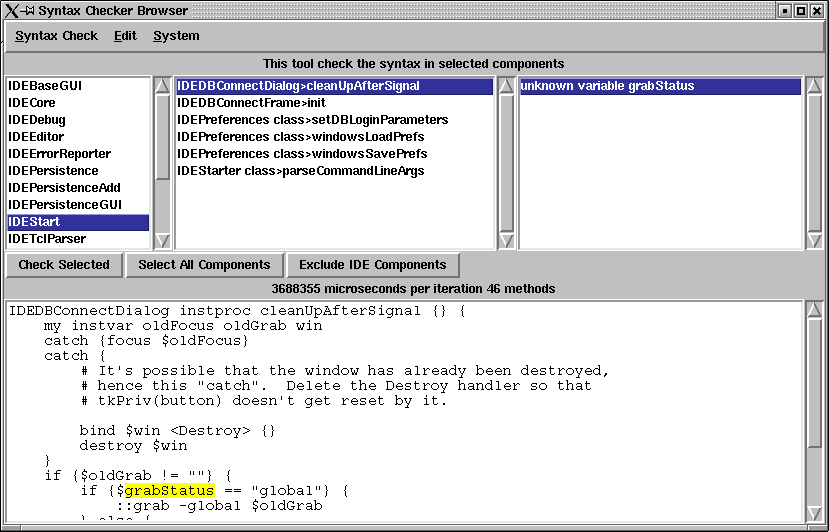
Tcl/XOTcl Parser
The XOTclIDE syntax checker works by using the Tcl parser programmed in XOTcl (see component IDETclParser). It produce the parser tree that can by used also for other purposes. At this time also the syntax highlighting is based of this parser.
Another ways of using Tcl parser in Tcl.
Normalize source code (pretty print)
convert source codes from or to another object oriented Tcl. (ITcl)
Refactoring tools in Smalltalk manner.
How to extend syntax interpretation
See the PrsContext>checkTclCommand method. The syntax of all Tcl control command are codes as simple pieces of code.
# while proc
[$command getElem 1] substituteContents
[$command getElem 2] evalContents
# set proc
if {$count==2} {
   my addVariableFrom [$command getElem 1]
} else {
   my checkVariableFrom [$command getElem 1] $notifier
} |
Problems
The syntax checker can not simulate the full power of Tcl interpreter. So it can interpret double substitution as:
set a putd $a hallo set a c set $a 2 puts $c |
Magic strings for checker
If you want to avoid syntax check for one method place the string "no syntax check" in this method (probably as comment).
If you want to force by the checker to accept one variable use "add variables (varName varName2)"
# add variables (c) set a c set $a 3 puts $c |
Checking Referenced Object Calls
There are also not possible to check referenced object call as
set a [MyClass new] $a doJob # also direct call by object name MyClass myObject myObject doJob |
To solve the problem the checker need some more type information. It could be coded as meta information to the class. for example:
Class A
A addMetaVariable drawContext DrawContext
A instproc draw {} {
   my instvar drawContext
   $drawContext drawLine 0 2 0 50
} |
set a [MyClass new] # variableType a MyClass $a doJob |
So there is a chance to make very powerful Tcl developing systems even with type safe syntax checking.